Understanding Temporal
A Temporal application has two halves: the code you write, and the Temporal Service that runs it. This page introduces the pieces of each and how they fit together.
Why Temporal covers what the platform replaces and why you would adopt it. Read this page first for the vocabulary (Workflow, Activity, Worker, Task Queue, Event History), then go deeper with Temporal architecture and How Temporal works.
Durable Execution
Temporal runs your application code as a Durable Execution. Once a Workflow starts, it runs to completion, whether that takes a second or a year. If the process running it crashes, the Temporal Service hands the work to another process, which rebuilds the state of the execution and resumes at the point where it stopped, with local variables and progress intact.
Without that guarantee, a crash loses the state of an in-flight process. Recovering it takes a state table, checkpoint columns, a reconciliation job, and retry logic at every call site — code that has nothing to do with the problem you set out to solve, and that you have to continuously maintain. Temporal moves that layer into the platform, so what you write is the business logic.
Workflows
A Workflow is your business process defined in code, with each step written as ordinary control flow: loops, conditionals, and function calls. You have probably used one today without calling it that:
- Transferring money in a banking app
- Booking a vacation
- Filing an expense report
- Onboarding a new employee
- Deploying cloud infrastructure
- Training a model
Temporal is not a no-code Workflow engine. You write Workflows in your own language, editor, and version control, and you keep the control flow of a normal program.
Workflow code must be deterministic because Temporal reruns it to rebuild state after a failure. Anything that talks to the outside world belongs in an Activity. See deterministic constraints for the rules.
A running Workflow can also:
- Wait on a durable Timer for minutes or months.
- Receive Signals and Updates, and answer Queries, while it runs.
- Start Child Workflows to break a large process into parts.
- Run on a Schedule instead of being started by a Client.
- Be held in place with Workflow Pause during an incident, without terminating it or losing state.
Activities
Activities are the units of work that touch the outside world: calling an API, writing to a database, sending an email, charging a card. They are plain functions or methods, depending on the language, and you call them from Workflow code.
Because those calls fail, Temporal supervises them. Each Activity gets a Retry Policy, timeouts, and optional heartbeats from configuration rather than from code you wrote. A failed Activity retries with backoff, and an Activity whose Worker dies is rescheduled.
You can also run an Activity on its own. A Standalone Activity is a top-level Activity Execution started directly by a Client, with no Workflow around it. It gives you durable retries, a Run ID you can cancel or query, and deduplication at submit time, which makes it Temporal's job queue for teams moving off Celery, Sidekiq, or a homegrown broker. Deploy the Activity to a Worker once, then invoke it standalone or from inside a Workflow.
Use a Workflow when you need to orchestrate several Activities, keep state between steps, or compensate for a partial failure. Use a Standalone Activity when you need to run one unit of work reliably.
Temporal SDKs
A Temporal SDK is the open-source library you add to your application. It provides the APIs to define Workflows and Activities, to configure and run Workers, and to create a Temporal Client — the object your application uses to start Workflows, send Signals, run Queries, and fetch results.
Temporal has eight SDKs: .NET, Go, Java, PHP, Python, Ruby, Rust, and TypeScript. Workflows written in different languages can call each other, so a polyglot organization does not have to standardize on one language first. Adding an SDK to an existing project does not change how you build or deploy it. For what each SDK provides, see About Temporal SDKs.
Workers
A Worker is the part of your application that runs Workflow and Activity code. You build it with an SDK, and you deploy it on your own infrastructure.
A common misconception is that the Temporal Service runs your code. It does not. Workers run your code and handle your data, inside your own network, with your own encryption libraries and keys. The Temporal Service schedules the work and records what happened.
Workers scale horizontally: one while you develop, and dozens, hundreds, or thousands in production. They have historically been long-running processes on bare metal, virtual machines, or in containers. Serverless Workers also run them on AWS Lambda and GCP Cloud Run, with no process to keep alive between invocations.
Long-running Workflows outlive the code that started them, which is the hardest part of operating one. Worker Versioning pins each Workflow Execution to the Worker Deployment Version it started on, so a running execution finishes on the code it began with while new executions go to the new version.
Task Queues
Workers do not receive work; they ask for it. Each Worker polls one or more named Task Queues, and the Temporal Service matches pending Tasks to the Workers polling that queue. Nothing is pushed to a Worker, so a Worker that is down or saturated stops polling and its Tasks wait until a Worker is available.
Task Queues are also how you route and isolate work: a queue per service, per Worker fleet, or per hardware type. Task Queue Priority and Fairness dispatches urgent Tasks ahead of bulk work and keeps one tenant or customer from monopolizing a queue.
The Temporal Service
The Temporal Service is the backend that orchestrates executions and stores their state. It is several services behind a single gRPC endpoint:
- The Frontend Service is the API that Clients, Workers, the CLI, and the Web UI all connect to. It handles authorization, rate limiting, and routing.
- The History Service owns each Workflow Execution: its state and its Event History, persisted to a database.
- The Matching Service manages the Task Queues and hands Tasks to polling Workers.
- The Worker Service runs Temporal's own internal Workflows, such as archival and Visibility indexing. It is separate from the Workers that run your code.
Persistence is Cassandra, MySQL, PostgreSQL, or SQLite, with Elasticsearch as an option for advanced Visibility.
Run the Temporal Service yourself, or use Temporal Cloud and skip operating the database, the shards, and multi-region failover. For a walkthrough of the services and what each one does on a request, see Temporal architecture.
Event History
The Event History is the durable log behind Durable Execution: a complete, ordered record of everything that happened in a Workflow Execution.
Workflow code does not perform actions directly. When your Workflow calls an SDK API to execute an Activity or start a Timer, the SDK records a Command, and the Worker sends it to the Temporal Service when the Workflow Task completes. The Temporal Service acts on the Command, scheduling the Activity or setting the Timer, and appends the corresponding Events to the Event History.
That is why a crash is recoverable. A new Worker fetches the Event History, replays the Workflow code against it to rebuild local state, and continues from the point of failure as if the failure never happened.
For the step-by-step exchange between Client, Temporal Service, and Worker, including an interactive demo, see How Temporal works.
Tools to inspect and steer executions
Every Workflow Execution carries a durable record of what happened, so debugging starts from evidence rather than reconstruction.
Temporal UI
The Temporal UI, also called the Web UI, is a browser interface for the state of your application: which Workflow Executions are running, their inputs and outputs, and the full Event History of any execution, including which Activity failed and with what error.
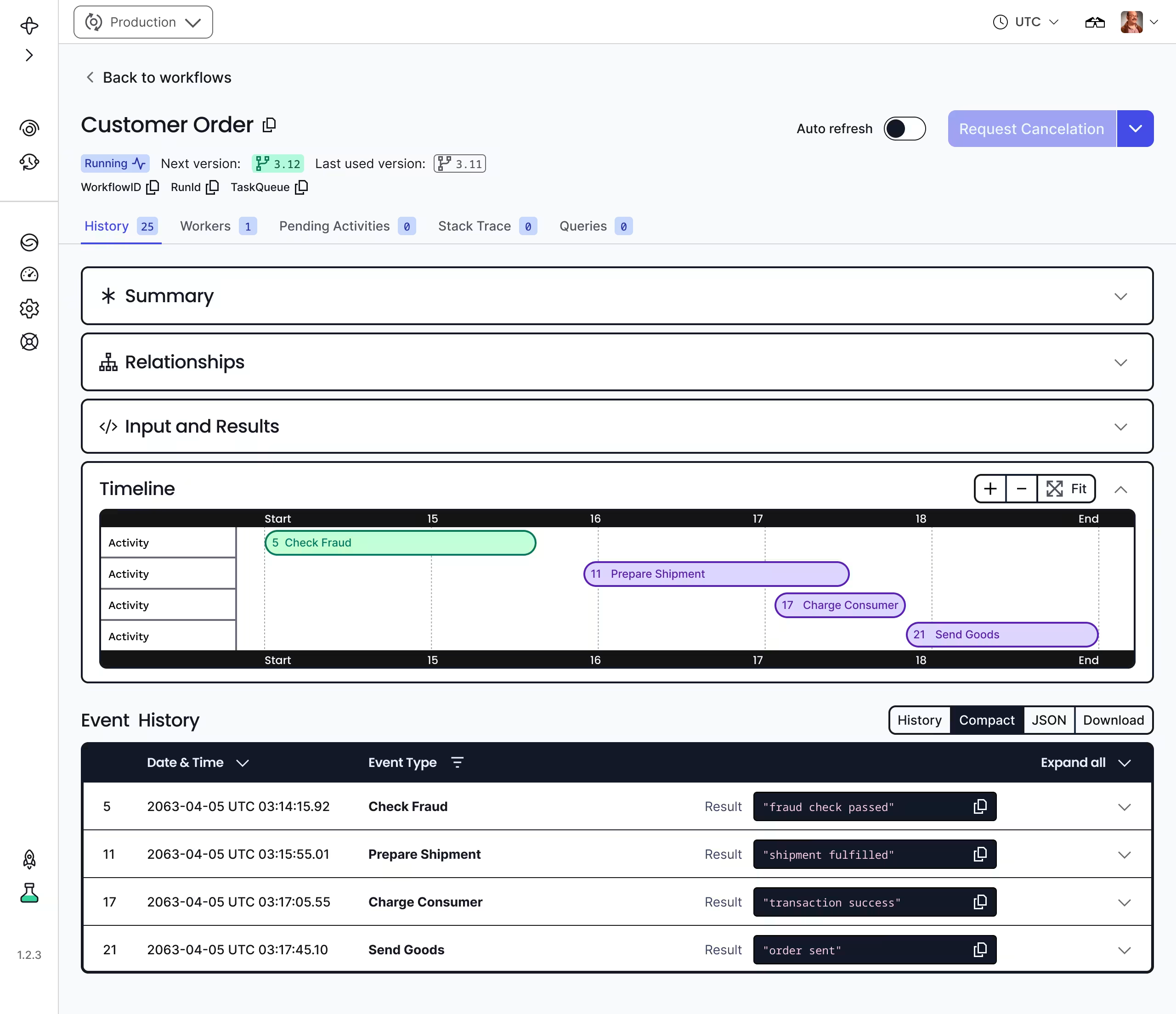
Recent Workflows page
List Filters and Search Attributes query executions by your own business data, so "every order stuck awaiting fraud review" is one query.
Temporal CLI
The Temporal CLI does the same work from a terminal or a script. Through it you can:
- Start a Workflow and pass it input
- Trace the progress of a Workflow Execution
- Inspect or export an Event History
- Cancel or terminate an execution
- Manage Namespaces, Schedules, and Search Attributes
temporal server start-dev also runs a local development Temporal Service and Web UI on your
machine, which is how most people write their first Workflow.
For the aggregate view, SDK and Temporal Service metrics feed Prometheus, Datadog, Elastic, and other OpenMetrics consumers.
Next steps
How Temporal works
The end-to-end lifecycle of a Workflow and Activity, step by step, with an interactive demo of each exchange.
Temporal architecture
The Frontend, History, Matching, and Worker services, the Persistence Layer, and how a Client reaches them.
Features
The development and production capabilities available through a Temporal SDK, from core primitives to observability.
Design patterns
Reusable Workflow and Activity techniques with runnable code: entity Workflows, fan-out, polling, sagas, and retry shapes.
To write your first Workflow, follow a getting started tutorial or take the Introduction to Temporal 101 course.